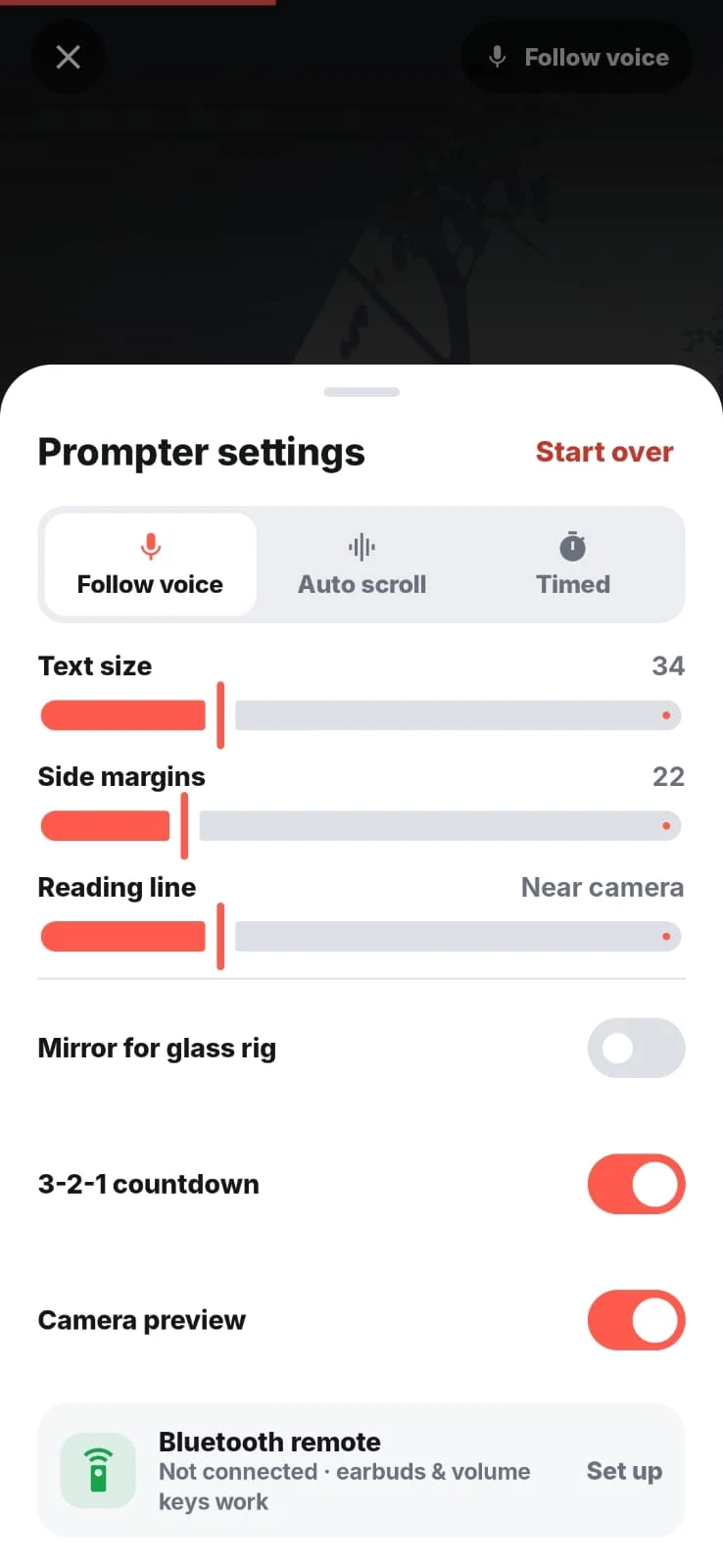
Prompter Settings Sheet — Switch Follow voice, Auto scroll, or Timed modes, and configure eye-contact reading line and Mirror for glass rig.
✓ In-House Product Engineered by NextGen TechEdge Solutions✓ 100% On-Device Speech Recognition Powered by Vosk (Kaldi Toolkit)✓ Script-Restricted Recognition Vocabulary for High Offline Accuracy✓ Custom Script Matching Engine That Waits on Pauses & Never Jumps Backwards✓ Native Kotlin & Jetpack Compose UI with Top Eye-Contact Reading Line✓ Integrated CameraX Video Recording (Up to 1080p) & MediaStore Gallery Export✓ Bluetooth Shutter Clickers, Foot Pedals, Keyboards & MediaSession Earbuds✓ Zero Accounts, Zero Subscriptions, Zero Ads & Zero Telemetry
Product Scope & Technical Transparency
In-house Android application developed by NextGen TechEdge Solutions. Targets modern Android SDK (API 36) with support for Android 8.0 (API 26) and newer (~22 MB app size; plus one-time ~40 MB English voice pack download for Follow voice mode).
1. Project Overview & Purpose
Most teleprompter applications that follow a speaker's voice stream microphone audio continuously to cloud transcription servers, rely on recurring subscription fees to fund server compute, and require user accounts that track script activity. Presenters who prefer offline workflows are often pushed back to fixed-speed auto-scrolling or rigid timed countdowns that force unnatural delivery whenever they pause or emphasize a point.
NextGen TechEdge Solutions engineered CuePrompt to solve this directly on the presenter's phone. Written as a native Android application, CuePrompt listens to your speech offline, advances your script strictly when confident, supports integrated video capture, and leaves no audio or personal data on external servers—enabling the product to remain permanently free with zero ads, zero watermarks, and zero account requirements.
2. The Challenges of Offline Voice-Following
Running responsive speech tracking entirely on consumer mobile phones requires solving problems that cloud-connected apps avoid:
Mobile Compute vs. Cloud Server Budgets: Cloud speech services run large acoustic and language models on data-center hardware. CuePrompt had to operate smoothly within the CPU, memory, and thermal envelope of ordinary mid-range Android phones without cloud offloading.
Human Delivery Isn't Linear: Presenters pause, repeat words, improvise asides, clear their throats, or skip lines. A naive word matcher that reacts to every isolated partial token quickly jumps to common function words like “the” elsewhere in the script.
Hardware Contention During Video Capture: Both CameraX video recording and voice-following need access to microphone audio. Across fragmented Android devices, hardware abstraction layers can silently hand digital zeros to a secondary listener while recording video.
Fragmented Remote Protocols: Camera shutter buttons impersonate hardware volume keys, presentation clickers emit Page Up/Down or arrow keys, and wireless earbuds deliver commands through Android media buttons rather than keyboard key events.
3. Native Android Architecture & Concurrency
CuePrompt is engineered natively in 100% Kotlin without web wrappers or cross-platform DOM overhead, targeting the latest Android SDK (API 36) while maintaining compatibility back to Android 8.0 (API 26):
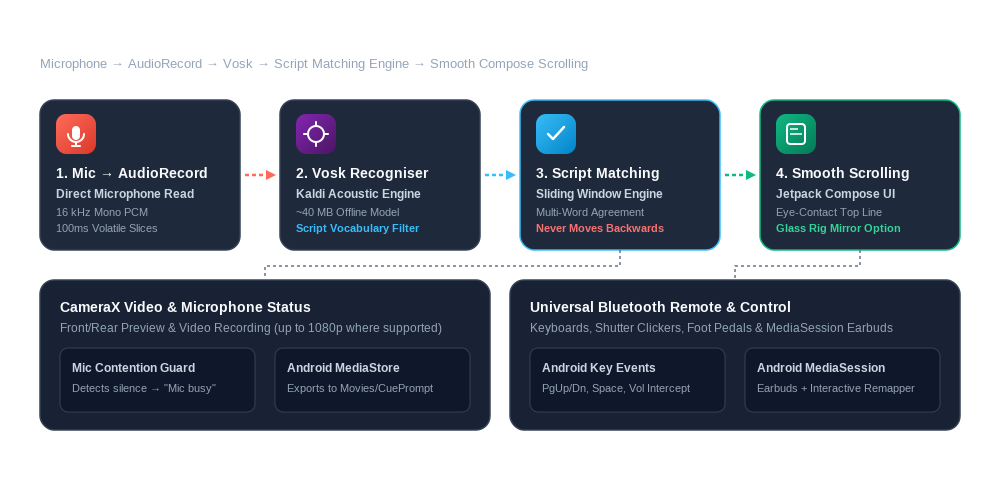
Isolated Background Audio Pipeline: Continuous 16 kHz mono microphone polling via Android AudioRecord runs on dedicated background execution threads, keeping UI rendering responsive during live teleprompting and video capture.
Clear State Separation: Prompter scroll state, active reading word index, camera recording state, and remote key events flow cleanly between native Android system services and declarative UI components.
Native Cold-Start Experience: Implements the Android SplashScreen API for fast startup directly into the script library, while an optional background voice-pack download completes unobtrusively so users exploring scripts or using Auto scroll / Timed modes aren't blocked.
4. Kotlin & Jetpack Compose Implementation
Every screen, modal sheet, script card, and live prompter overlay in CuePrompt is crafted in Jetpack Compose with Material 3 components:
Camera-Lens Eye-Contact Alignment: Reading text positioned in the middle of a phone display causes viewers to see the speaker's gaze drop downward. CuePrompt positions the reading line near the top edge of the screen directly below the front camera lens so scrolling lines glide up into the presenter's natural sightline.
Visual Speech Progress Cues: As spoken words match, the current line smoothly centers on the reading line, active words highlight in contrast, and completed lines dim gently out of visual focus.
Customizable Prompter Controls & Inter Typeface: Uses the legible open-source Inter typeface (character-trimmed for binary size efficiency), paired with live sliders for text size, side margins, reading-line placement, a 3-2-1 countdown toggle, camera preview toggle, three scrolling modes (Follow voice, Auto scroll, Timed), and a Mirror for glass rig switch for optical beam-splitter rigs.
5. Vosk On-Device Speech Recognition
Voice-following uses the open-source Vosk speech recognition engine (built on the Kaldi toolkit) loaded locally on the device via Java Native Access (JNA):
One-Time ~40 MB Acoustic Model: On first use of Follow voice mode, CuePrompt downloads a compact English acoustic model (~40 MB) to app-private storage. After this single download, full voice tracking works completely offline. Users who only need Auto scroll or Timed scrolling never need to download the model.
Script-Restricted Vocabulary Grammar: Instead of asking a compact mobile speech model to disambiguate every word across the entire English language, CuePrompt extracts the distinct vocabulary from the presenter's active script before starting and passes that constrained word list into Vosk. Trading open dictation for script-specific recognition makes a compact mobile model dramatically more reliable on mid-range phones.
In-Memory Audio Processing: Raw PCM frames sampled at 16 kHz mono via AudioRecord in 100-millisecond slices are processed directly in memory and discarded immediately—audio is never written to disk or sent across a network.
6. Custom Confidence-Based Script Matching
Recognition output from live speech is passed through CuePrompt's proprietary script-following engine before any scroll offset updates:
Sliding Context Comparison: The engine evaluates the last few recognized words against script words slightly behind and well ahead of the presenter's current position, tolerating minor phonetic or transcription variations (for instance, matching “habbits” against “habits”).
Multi-Word Consensus Requirement: Rather than reacting to an ambiguous single token, jumping forward requires consecutive multi-word agreement—preventing erratic leaps while still catching up cleanly if a speaker intentionally skips ahead a line or paragraph.
Strict Forward-Only Progression: If a speaker pauses, answers an interruption, or ad-libs off-script, the prompter waits calmly and never moves backwards on its own. Manual rewind remains one tap away on screen or via a remote's Back button.
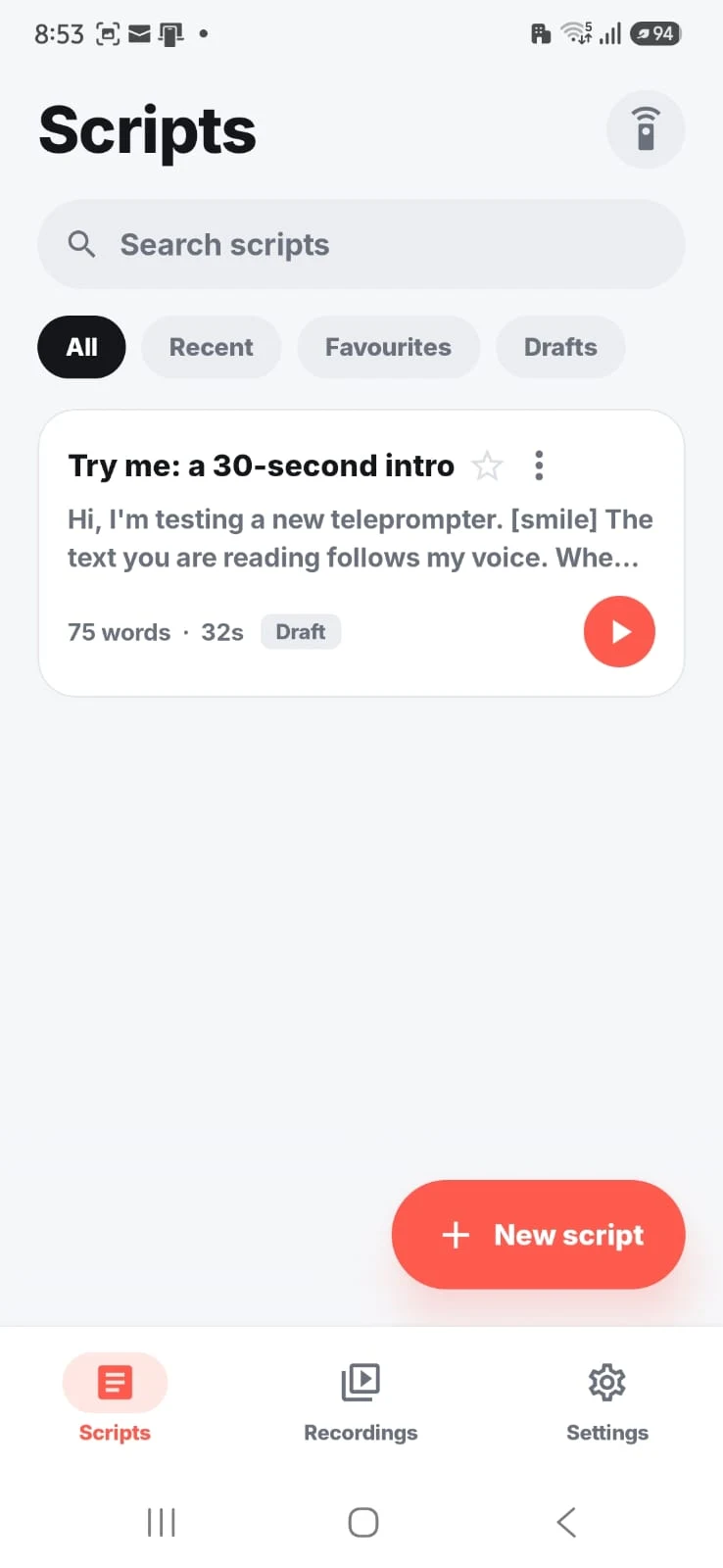
Bracketed Non-Spoken Cue Parsing: Performance directions enclosed in square brackets (such as [smile] or [show product]) are rendered visually in accent color for the presenter while being stripped out of the voice-tracking grammar so the engine never stalls waiting for unspoken cues.
7. End-to-End Voice-Following Pipeline
Audio ingestion, speech decoding, confidence matching, and Compose UI animation operate in a continuous linear flow:
Presenters can record directly inside CuePrompt without switching to an external camera app:
Integrated CameraX Capture: Powers the camera preview layered behind the script with front/rear camera switching and video recording up to 1080p, automatically selecting supported camera quality profiles on devices with lower sensor ceilings.
Graceful Microphone Contention Handling: On Android hardware where the camera video encoder claims exclusive microphone access and feeds digital silence to secondary listeners, CuePrompt monitors incoming PCM audio buffers. Rather than failing silently, it displays a clear “Mic busy” status indicator while preserving crystal-clear audio inside the recorded video file.
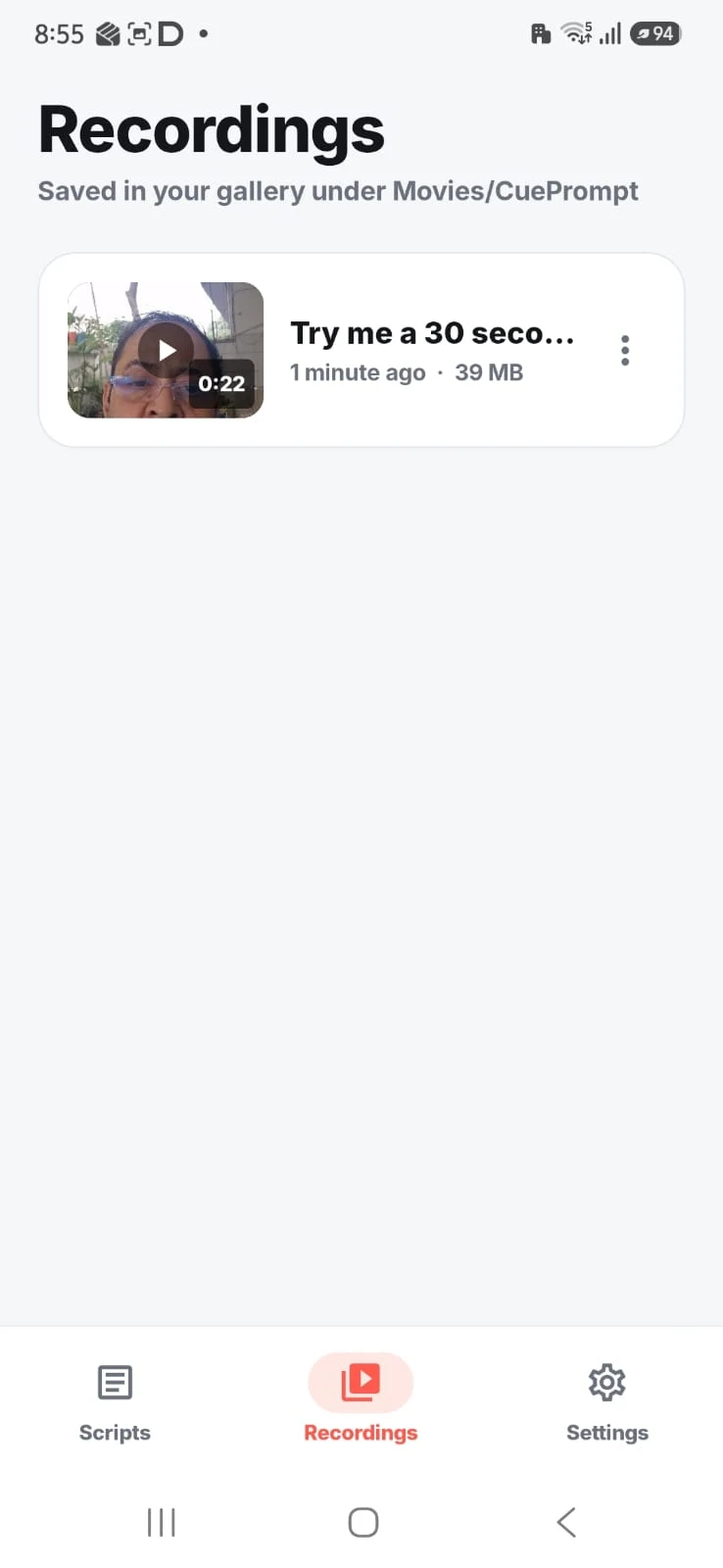
Public MediaStore Export: Recorded takes save cleanly through Android MediaStore directly into the device gallery under Movies/CuePrompt for immediate sharing or editing.
9. Universal Bluetooth Remote & MediaSession Control
Speakers use widely varying wireless clickers, keyboards, pedals, and earbuds on set. CuePrompt normalizes these disparate input channels into configurable prompter actions:
Keyboard & Presentation Clicker Key Events: Directly handles standard hardware keys including Page Up/Down, Arrow keys, Space, Plus/Equals, and Minus for hands-free speed, play/pause, and line stepping.
Volume-Button Shutter Remote Interception: Inexpensive Bluetooth camera-shutter remotes typically emulate Volume Up key presses. While the prompter screen is active, CuePrompt intercepts these key events to control playback without triggering the system volume slider popup.
Android MediaSession Earbud Support: Holding an active MediaSession routes tap commands from wireless earbuds (play/pause media buttons) into the teleprompter instead of launching background music players.
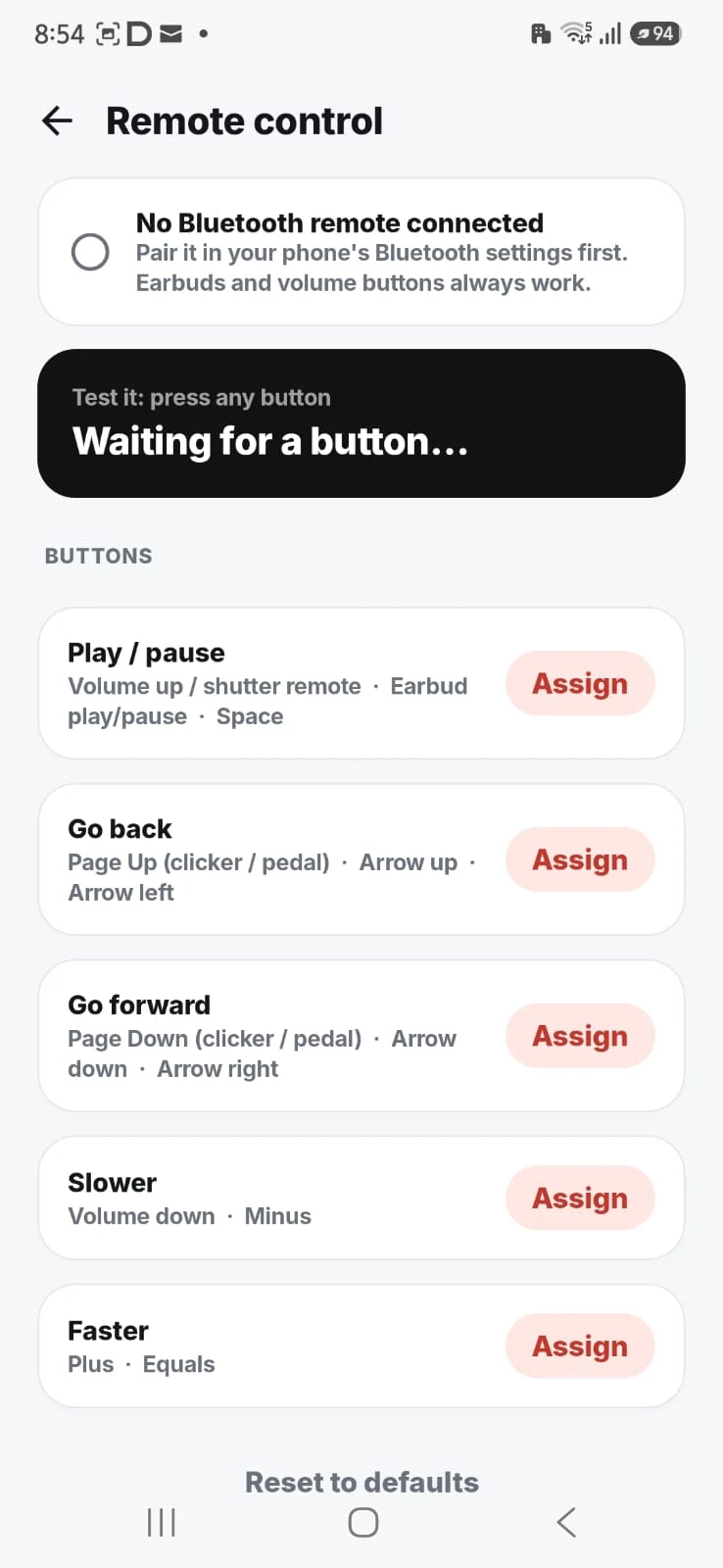
Interactive Remote Button Tester: The dedicated Remote control settings screen shows a live diagnostics box (“Waiting for a button...”) so presenters can press any unfamiliar accessory key once and assign it to Play / pause, Go back, Go forward, Slower, or Faster.
Privacy-First & Serverless Architecture
No Backend Servers. No User Accounts. No Analytics. No Ads SDKs.
CuePrompt runs with zero cloud dependencies after setup. Scripts stay inside the app in app-private storage, microphone audio is discarded in memory after local word recognition, and recorded videos go strictly to local device storage under Movies/CuePrompt. The only network request the application makes is downloading the public ~40 MB Vosk English speech model on demand, carrying no user credentials or personal data.
CuePrompt balances compact binary packaging with hardware resilience and automated regression testing:
Compact Footprint (~22 MB): Bundles native recognition binaries only for processor architectures used on modern Android smartphones, applies Gradle R8 code shrinking, trims the Inter font asset to used characters, and downloads the optional ~40 MB speech pack separately.
Hardware Diversity Safeguards: Supports Android 8.0 (API 26) up to API 36, dynamically adapts camera quality down from 1080p where required by camera hardware, and provides Auto scroll and Timed prompting on every supported handset.
Automated Testing Pyramid:
JUnit Tests: Automated unit verification for the script-following matcher, tolerance edge cases, punctuation handling, and bracketed cue extraction.
Robolectric Tests: Fast JVM execution of Android lifecycle behavior and remote key event handling.
Roborazzi Screenshot Tests: Automated visual regression testing rendering every main application screen across builds to catch layout drift before release.
Production capabilities shipped in the Android application alongside genuine UI captures and clearly separated future roadmap items:
✓
Offline voice-following after one-time ~40 MB English model download, plus zero-download Auto scroll and Timed modes
✓
Script-restricted Vosk speech recognition fed in 100 ms 16 kHz mono PCM chunks via Android AudioRecord
✓
Forward-only confidence script matcher that waits on natural pauses, tolerates minor mis-hearings, and skips bracketed cues like [smile]
✓
Jetpack Compose UI keeping active reading lines under the camera lens with Mirror for glass rig, 3-2-1 countdown, and font/margin sliders
✓
Integrated CameraX front/rear recording (up to 1080p where supported) exporting to Movies/CuePrompt with explicit Mic busy guard
✓
Universal remote control support across clickers, pedals, keyboards, volume-button shutters, MediaSession earbuds, and live key remapping
✓
Automated verification suite combining JUnit logic tests, Robolectric Android tests, and Roborazzi screen renders
✓
Permanently free distribution with zero subscriptions, zero ads, zero watermarks, and zero accounts
Planned Roadmap (Not Yet Available)
To maintain strict transparency between shipped functionality and future development, the following capabilities remain planned enhancements rather than shipped features:
Additional voice-follow language models beyond English.
Floating teleprompter overlay mode working on top of third-party camera applications.
Shared single-capture audio pipeline so voice-follow and video recording never compete for microphone access on any Android OEM device.
Direct script import from local document files and Google Docs.
DOCUMENTED APPLICATION INTERFACES
Production Screenshots & Functional States
Genuine Android UI captures drawn directly from CuePrompt builds (click any card to inspect full resolution):
Enlarge
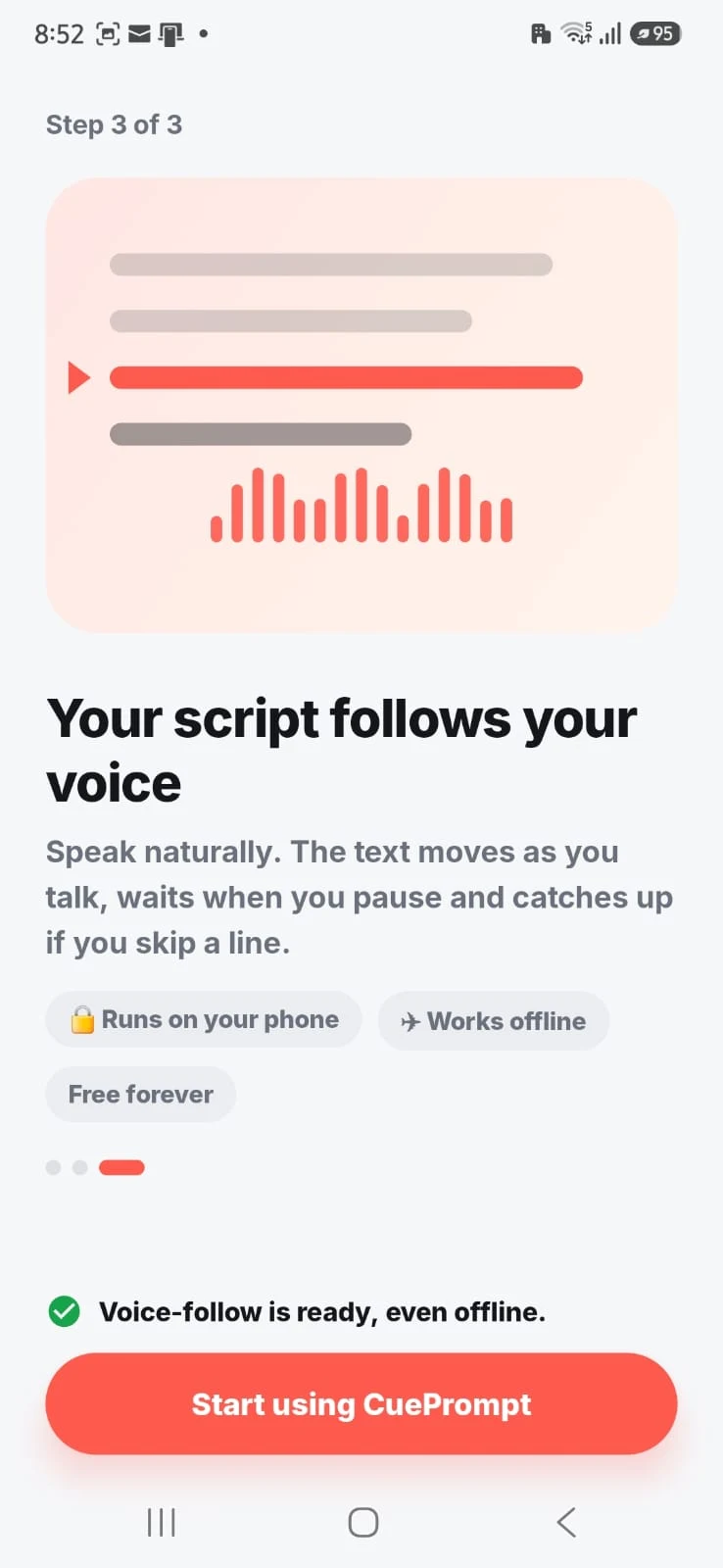
01 — Offline Voice-Follow Ready: Confirms on-device Vosk setup is complete with zero accounts or internet required.
Enlarge
02 — Prompter Settings Sheet: Live typography, margin, eye-contact reading line, Mirror for glass rig, and camera toggles.
Enlarge
03 — Scripts Library: Local script organization showing word count, speaking duration, and bracketed performance cues.
Enlarge
04 — Remote Control Mapping: Live button event tester supporting Bluetooth shutters, earbuds, keyboards, and foot pedals.
Binary shrinking (~22 MB app size), logic unit tests, JVM lifecycle tests, and automated visual screenshots
Open-Source Software Acknowledgments
CuePrompt builds upon respected open-source libraries: Vosk speech recognition & English acoustic model (Apache License 2.0, Alpha Cephei), JNA / Java Native Access (Apache License 2.0), Android Jetpack modules including Compose, CameraX & Media (Apache License 2.0), and the Inter typeface (SIL Open Font License 1.1).

 Enlarge